
Management
Access the Web-interface Administration
- Default User: admin
- Default Password: admin

In the left sidebar, there are several menu:
- Domains for add/remove domain
- Monitors for add/remove monitoring service
- Records for add/remove records of domains (A, NS, SOA, TXT, and many more)
- Types for add/remove types of record (for example you create custom record, except standar record types)
- Views for add/remove ACL(Access list record, who has access your record public/private)
- Users for add/remove users in web administration
Domains
Remove default domains, before delete domains you must delete all records in domain.
In Records menu

Delete default domains

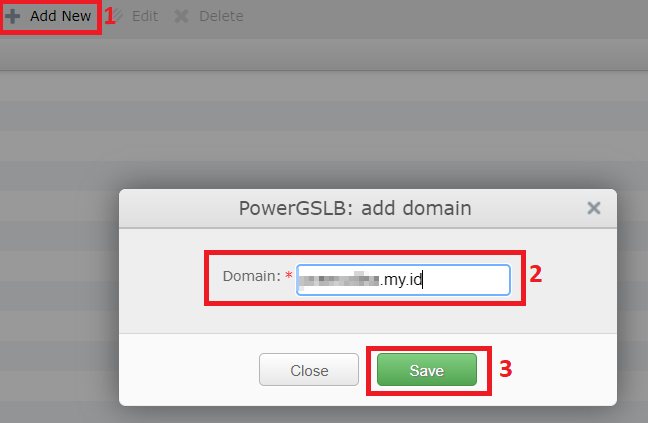
Add Domain

Records
Add SOA Records
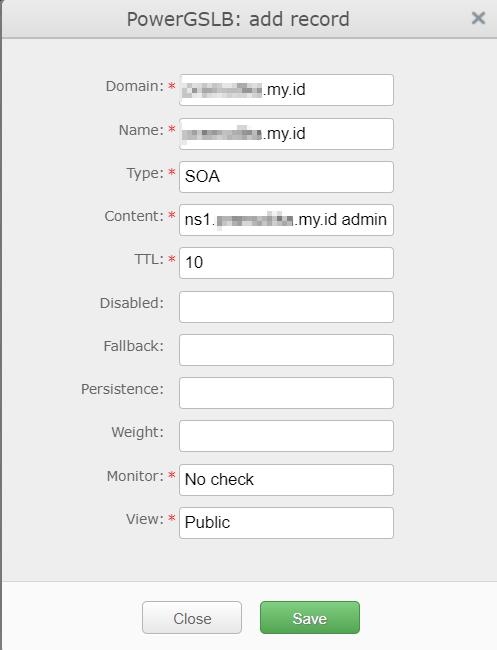
example content:
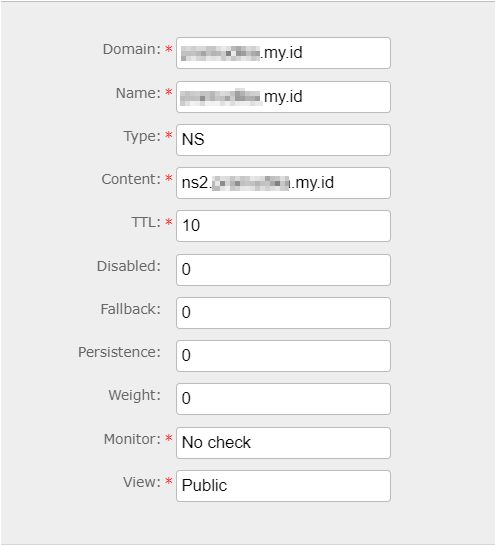
ns1.domainname.my.id admin.domainname.my.id. 202307241 21600 3600 1209600 10Add NS Records
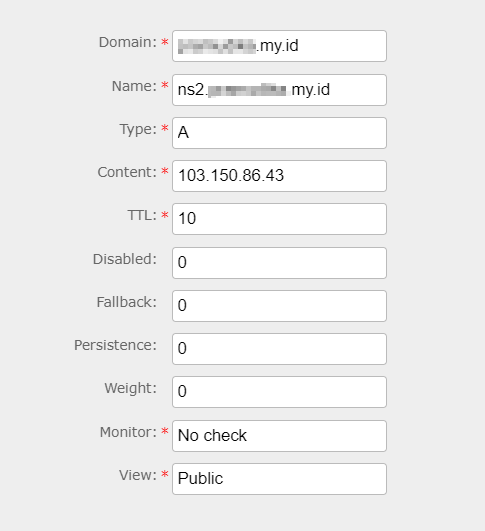
Add A Records
Monitors
Monitors is for health checking service using TCP/UDP/ICMP/HTTP protocols.
Example: health check smtp service

JSON format example:
{"type": "tcp", "ip": "103.93.56.62", "port": 25, "interval": 3, "timeout": 1, "fall": 3, "rise": 5}Mandatory parameters
| parameter | description |
|---|---|
| type | check type |
| interval | interval between checks |
| timeout | check timeout |
| fall | number of failed checks to disable record |
| rise | number of successful checks to enable record |
You can read complete example in here