How to access wordpress replica?
You have 2 server, how client access it?
- Client can access by using DNS – you must configure Double A Record in DNS(load balancing round robin by default)
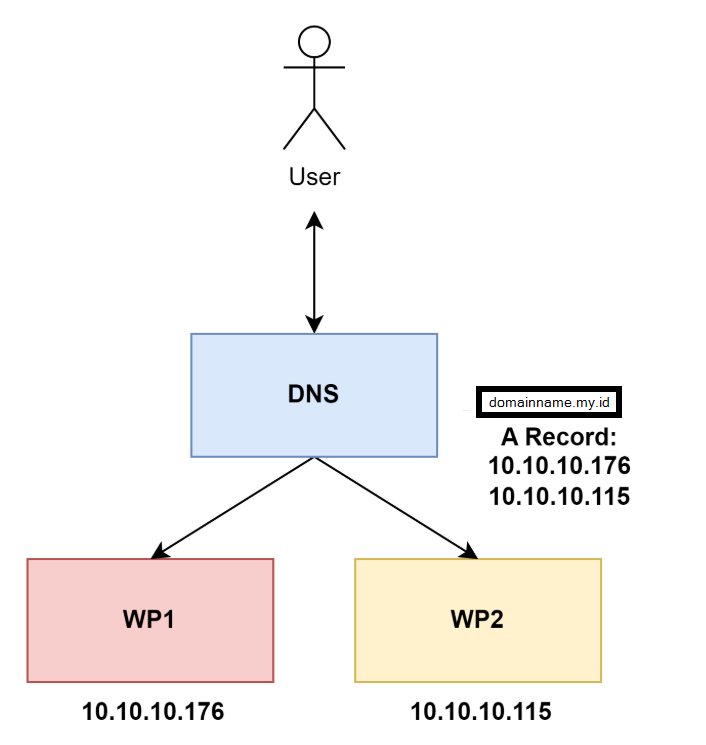
Client access using loadbalancer – you must setup network/server for loadbalancing traffic.
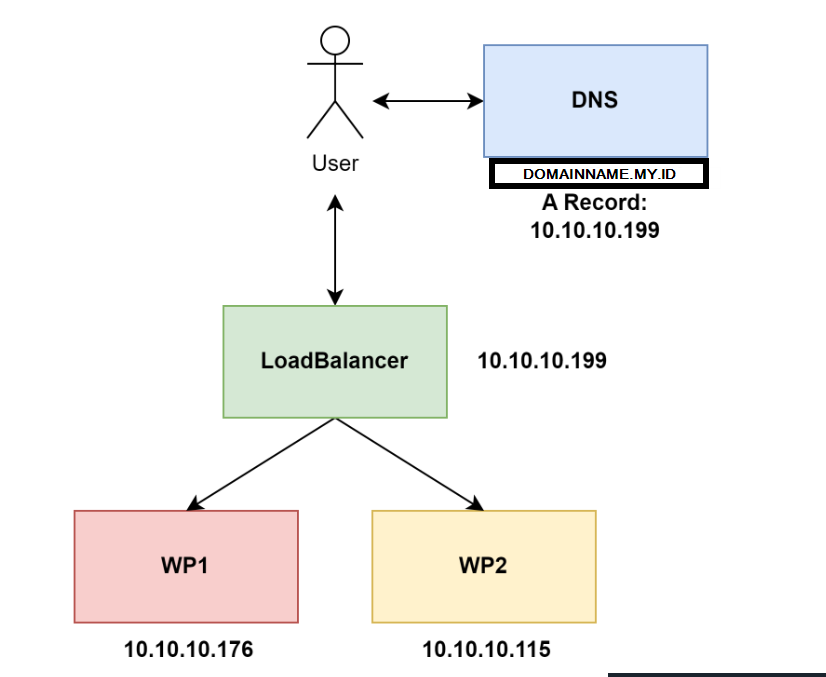
Oke, in this article i will use loadbalancer using nginx
Environment
OS: Ubuntu 22.04 LTS
1 Server, with IP Address:
10.10.10.199
Install Nginx
apt install nginx -ySetup Loadbalancing
Add upstream/backend server/wp server
Change default conf same as below
vim /etc/nginx/sites-available/lbupstream srv-wp {
#default using roundrobin
#least_conn;
#ip_hash;
server 10.10.10.176:80;
server 10.10.10.115:80;
}
server {
listen 80;
server_name domainname.my.id;
location / {
proxy_pass http://srv-wp;
}
}If you not define loadbalancing method in upstream the default is roundrobin. Other method available
- Least Connection
Select backend server by least connection in backend, for example:
srv1 have 4 connection connected, srv2 have 5 connection, srv3 have 3 connection.
if u use this method, the next client is handled by srv3, because srv3 have least connection
- IP Hash
Select backend server based on client IP Address
if user1 have a connection handled by srv1, then continuously will still be handled by srv1.
which can be useful for applications that require persistence session / sticky session.
you can read complete nginx load balancer in Here
You can add custom header for logging and get real IP Address Client, read in Here
Restart nginx server
systemctl restart nginxAccess from loadbalancer